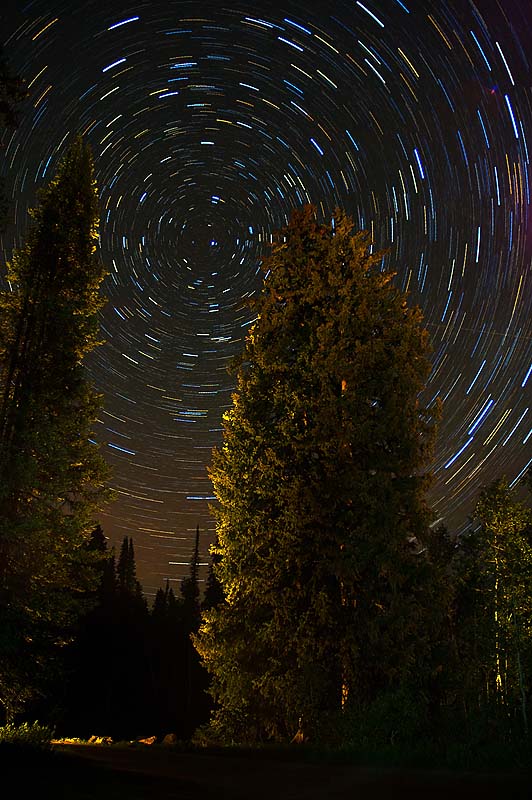
So I am back with a little more of the blind leading the blind. Everyone ready? Get that cane a moving we are going full steam ahead!
My first tip is to get that camera out of Auto mode as soon as you feel comfortable with how to zoom, and where the shutter button is. Once you take the camera out of auto you are effectively beginning to make decisions about what the photo situation is and what you want the camera to do. Most all cameras have an assortment of controls that work to change settings according to your situation. Try using some of those and see how you like them. For instances if you are photographing fast action events, the sports mode might be the perfect setting for you to use. If you are taking portraits then you could use the portrait setting and tada your camera settings will optimize for a portrait. What does the camera do when you move to those other modes? I really don't know as I never use them but try them out as you may just find they are what you are looking for. I personally am a bit of a control freak. I want my pictures to look a certain way and want to understand completely how to achieve the affect that I want. If this is to much then try out those modes that I talked about. I am positive you will see improvements, and will begin understand better how your camera works and, this is a very good thing.
For those who want to learn a little more read on!
Most cameras have Four special settings that are really all you need. These four settings give you all the creative control you could ever want! Here are the four modes that I use the most:
- P which is the flexible program mode. This mode sets the exposure automatically (a bit like auto mode) but allows you to change the aperture and shutter speed to any combination that gives your set exposure. This mode is useful as it allows you to control a plethora of other features that you can't access while in Auto mode (more about what aperture and shutter speed are listed in the modes that control those particular items).
- A or Av which is aperture priority mode. You set the aperture size and the the shutter speed is matched to give correct exposure. Aperture is the size of the hole that lets in light to the sensor in the camera. It functions much like the iris does for for your eyes. A smaller hole lets in less light and a larger hole lets in more light (there are other important functions of the aperture which will be discussed in detail later).
- S or Tv which is the shutter speed mode. You set the shutter speed and the camera adjusts the aperture to give the correct exposure. This is the amount of time that the sensor is exposed to the light. Unlike our eyes where we allow a continous stream of light the camera captures a frame of light (the sensor is exposed to the scene for a set amount of time). When light is low then we end up with a long amount of time for the shutter to be open. When we have our shutter open for long periods of time blur due to motion may occur. The motion may be from motion of the subject (like an active kid) or from the camera person not holding the camera steady (like someone taking a picture while while suffering from early stages of hypothermia).
- M which is manual mode. You set aperture and shutter speed, the camera does not change any settings to adjust for exposure (This is the mode I use +75% of the time).
All this information may bring the question: what do you mean by correct exposure? Well this is actually dependent on the photographer. Perhaps it is best to describe it as the brightness (or lack there of) that we see things with our own eyes. Correct exposure would be to make light levels in the photo mimic real life. Sometimes when we chose a different exposure than what we would see with our eyes we get really interesting results.
To understand exposure better here is a little example. Imagine you were to take a picture with your camera in P mode, and your camera reads the correct exposure as:
| ISO | Shutter speed | Aperture |
| 100 | 1/100 | 8.0 |
The occassion is your childs surfing match. You know as does everyone that in order to capture the action of a sporting event you should make sure your shutter speed is fast like 1/500 of a second. So what options do we have to increase the shutter speed? If we open up the aperture we can gain shutter speed or we could increase the ISO which would give us an increase in shutter speed. We might make changes to the camera settings that look like something below:
| ISO | Shutter speed | Aperture |
| 100 | 1/100 | 8.0 |
|
| 100 | 1/200 | 5.6 |
|
| 200 | 1/400 | 5.6 |
|
| 400 | 1/800 | 5.6 |
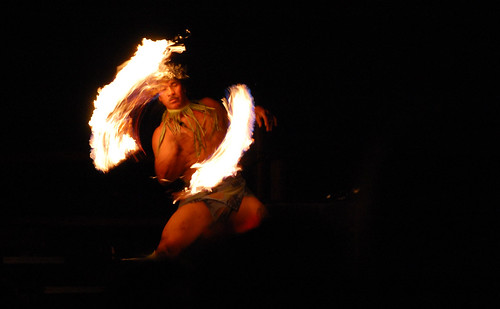
These photos were shot at something like 1/400 of a second. A bit faster would have helped capture the action even better.
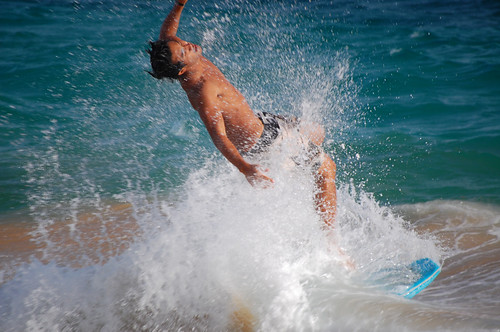
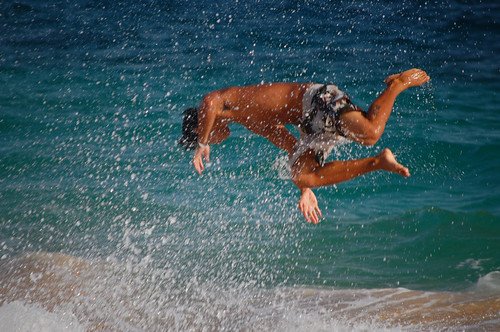
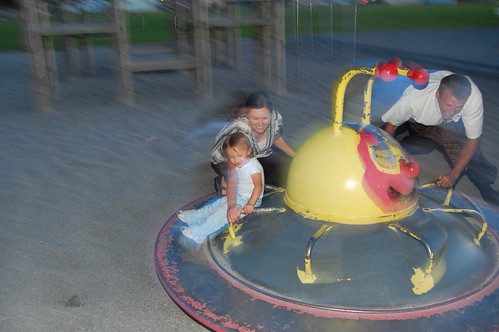
In Auto mode the camera would have set the first setting and we would have been very disapointed because our surfing star would have been blurry and in a not good way in every photo (ok I know not many in our family will be surfing stars but these are the photos I have taken that I have to work with). Of course there are other times when blur can be good. These are instances where you want to imply motion....
These photos were shot at much slower shutter speeds.
The reason that I have put the largest aperture at 5.6 is because this is ussualy the largest size available for many of the kit lenses and less expensive lenses. So what did we do to get that increase in shutter speed that we needed once when we had the aperture wide open? We moved to the next option, we increased the ISO or the sensitivity. Here is a quick break down of how aperture affects the shutter speed.
| Change in shutter speed | Arperture (1 stop increments) |
| 1X | 32 |
|
| 2X | 22 |
|
| 4X | 16 |
|
| 8X | 11 |
|
| 16X | 8 |
|
| 32X | 5.6 |
|
| 64X | 4.0 |
|
| 128X | 2.8 |
|
| 256X | 2.0 |
If you were using Auto mode the camera may have chosen to use an aperture of 8.0 but if you could open your aperture to 5.6 you would be able to increase the shutter speed 2x faster!
The other possible way to increase the shutter speed is to increase the sensitivity in the camera or the ISO. ISO is a little more straight forward, every doubling of ISO yeilds a double in shutter speed. This also works the other way around a double in ISO will allow you to close up your aperture a stop (the steps in the change of aperture above are often described as stops).
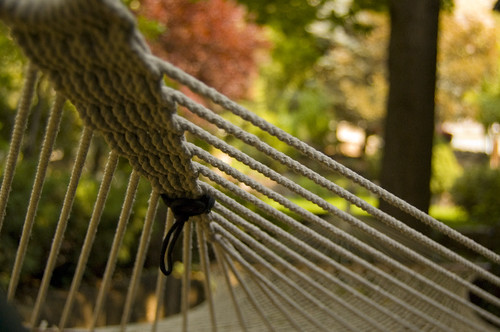
So why not open up the aperture as wide open as possible all the time? Because aperture affects something else called depth of field. Have you ever seen that photo where the subject was in focus but the back ground was really blurry (this affect is called bokeh)? This is due to a large aperture. This is popular for portrait type of work but not for landscape photos. Stopping down the aperture will decrease this affect and bring more items in the picture into focus as in the examples below.
This is an example of the aperature wide open with the kit lense on my D40 (something like f4.2):
Same picture but the aperature is stopped down to something like f22.
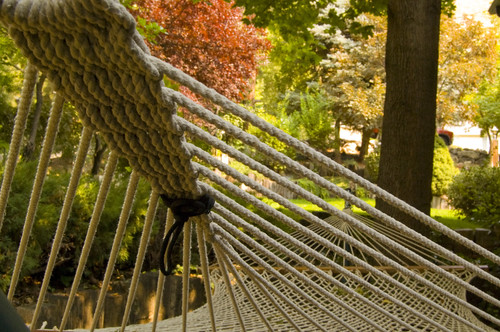
Ya I know this pictures will not win any awards but it is just as an example. Terry's hammock is not an eye catching architectual feature. I think it helps to have a visual as to how aperture affects the depth of field. Pop question, if you are taking a photo of the grand canyon what aperture would you prefer to use?
So this may bring up another question: Then why not bump the ISO to 1600 and leave it there all the time. Well when we bump up the ISO we also bump up the noise in a picture. Often times this noise is just not acceptable. I never use ISO 1600 on my camera due to the amount of noise it introduces. The noise issue is especially true for small point and shoot types of cameras. Of course there are times that getting a noisey picture is better than no picture. And if you get creative there may be times you want that blur thing going!
So lets recap some of the useful tidbits we have learned or remembered:
- Learning to use the camera is one of the ways to get better pictures. Experiment with different settings and see what you think.
- To really get control and allow those creative juices to flow, try to think about what you want to achieve and use one of those four magic modes we talked about to get you there. A large number in aperture gives a greater depth of field (remember that big numbers mean a smaller size) and higher shutter speeds freeze action. Small aperture numbers (think big hole) gets that nice blurry background thing going and slow shutter speeds give blur due to motion which can be used to imply motion.
- Exposure is due to a combination of three things: Aperture, Shutter speed and ISO.
Last thing is to remember to have fun, and remember digital is free so snap away. If you aren't shooting digital I can't really say much as I have no film experience. Happy shooting